

MyExpertPros vs Jobber: Which Makes More Sense for Your Business?
Last reviewed November 6, 2026. Prices and product details can change.
Published by MyExpertPros. Jobber prices checked November 5, 2026. MyExpertPros product details checked November 6, 2026.
Jobber is the more established and more automated platform. Higher plans add route optimization, job costing, and a large integration marketplace. MyExpertPros covers the daily workflow — customers, scheduling, estimates, invoices, and payments — at $0 a month, with a 1% fee on successful payments instead of a subscription. Which one costs less depends on how much you collect. Which one fits depends on how much automation you need.
We make MyExpertPros. Every Jobber price below comes from Jobber's own pricing page or help center.
Jobber is the better fit when you need
- Route optimization, job costing, two-way texting, or a custom automation builder
- Xero, payroll, a large app marketplace, or Zapier
- Native iPhone and Android apps, and live chat or phone support, today
MyExpertPros is the better fit when you need
- The core workflow without a monthly bill or a per-user fee
- A lower charge in slow or seasonal months
- QuickBooks Online, automated reminders, and online booking without buying a higher tier
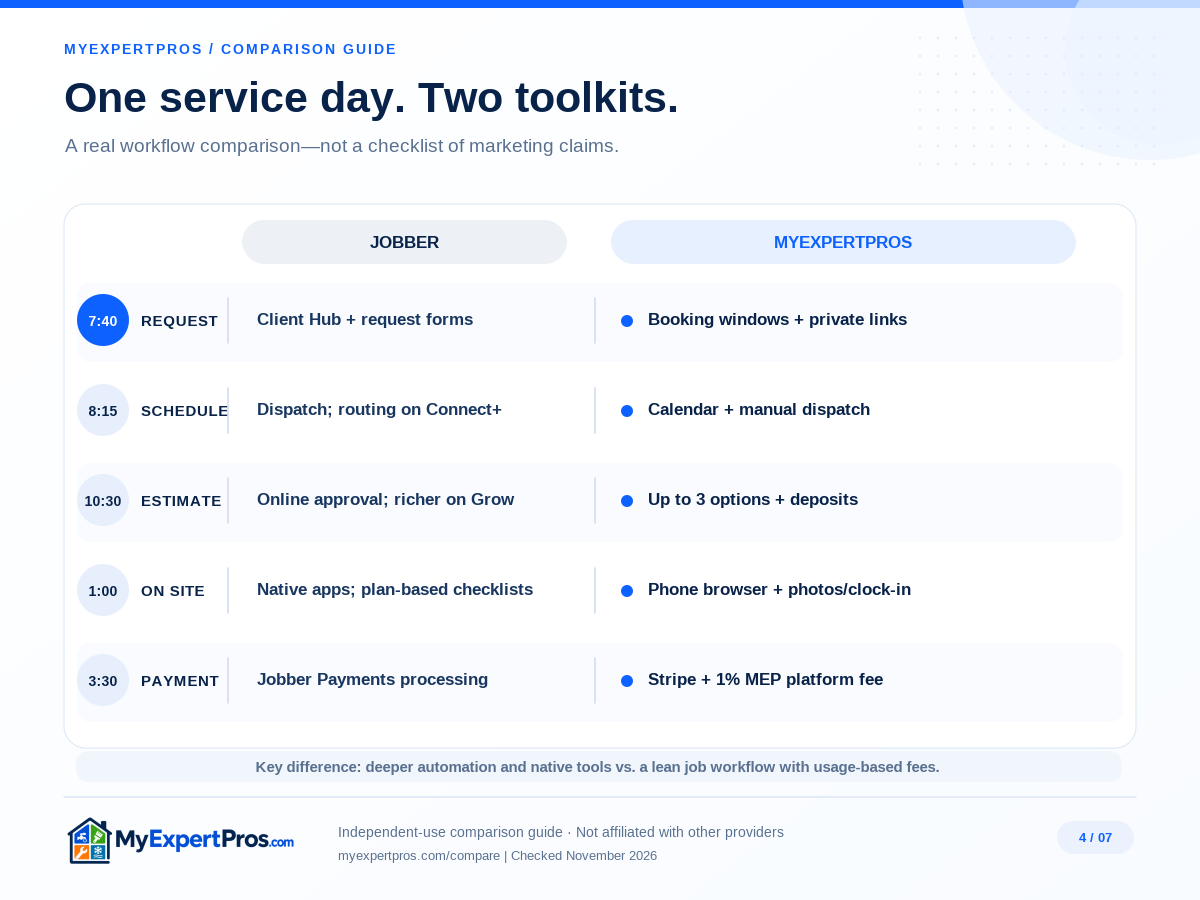
A contractor's day, in both systems
This is a hypothetical shop: an owner, an office manager, and three technicians.
7:40 a.m. — the request. The homeowner reports a leaking water heater. Jobber offers online booking, a request form, and Client Hub. Its Receptionist add-on can book a visit. MyExpertPros offers online booking: a published window can book itself, and a preferred time waits for the office to confirm. The optional AI receptionist answers the phone and website chat, shares hours and open windows, and hands the request to the team. It does not book the job or quote a price. A free directory listing is a separate product and can also bring in requests.
8:15 a.m. — scheduling. Both products put the visit on a calendar and assign a technician. Jobber's route optimization starts on Connect. MyExpertPros does not reorder routes.
10:30 a.m. — the estimate. Both let the customer approve an estimate online. MyExpertPros supports up to three options, a deposit, and follow-up texts on day 2 and day 5 that stop after approval or decline. Jobber's automatic follow-ups start on Connect, and richer quote options start on Grow.
1:00 p.m. — the work. Jobber has native iOS and Android apps, with checklists and time tracking from Connect up. MyExpertPros technicians use the office in a phone browser today. They can see their jobs, add job photos, and clock in. The native phone app is not in the app stores yet. The target is November 15, 2026. Checklists and commission tracking are not offered.
3:30 p.m. — the invoice. The job becomes an invoice and the homeowner pays by card. Jobber Payments charges 2.9% + 30¢ per online card payment. MyExpertPros keeps a 1% platform fee. Stripe's processing fee is separate, and MyExpertPros does not publish that rate. The customer pays the invoice total. Jobber Connect can chase unpaid invoices. MyExpertPros can send invoice reminders on the due date and again 3, 7, and 14 days later when that automation is on.
Feature comparison
| Feature | Jobber | MyExpertPros |
|---|---|---|
| Monthly subscription | $29–$699 depending on plan, team size, and billing term | $0 |
| Users | 1 on Core; 5, 10, or 15 on team plans; extra users $29 a month | Unlimited. Owner, Dispatcher, and Technician. No per-user fee. |
| Scheduling and dispatch | Included | Included |
| Route optimization | Connect and up | Not offered |
| Online booking | Included | Included |
| Estimates | Included. Richer quotes on Grow. | Included, up to three options, with online approval |
| Automated follow-ups | Connect and up | Included for the built-in reminders. No custom automation builder. |
| Invoicing | Included, including progress invoicing | Included. You can invoice a deposit, a later amount, or the balance. Repeating invoices bill weekly, monthly, quarterly, or yearly. |
| Online card payments | 2.9% + 30¢ | 1% platform fee, plus Stripe processing |
| Customer portal | Client Hub on all plans | Private links for booking, estimates, contracts, and invoices. Not a password-free hub. |
| Two-way texting | Grow and up | Not offered. Automated texts only. 150 segments a month are included. |
| Time tracking and job costing | Time tracking from Connect. Job costing from Grow. | Clock-in, shifts, and time on jobs are included. Job-cost reports are not offered. |
| Mobile apps | Native iOS and Android | Phone browser now. Native app target November 15, 2026. |
| Accounting and integrations | QuickBooks Online, Xero, a 100+ app marketplace, and Zapier | QuickBooks Online included. No Xero, payroll sync, marketplace, or Zapier. |
| AI receptionist | $29 a month for 30 conversations, then $0.79. Included on Plus. | Trial, then $7.99 or $19 a month. See the rates below. |
What each product costs
Jobber charges a subscription. MyExpertPros charges 1% of successful payments. MyExpertPros costs less on the software line while monthly payments subject to that 1% stay under 100 times the Jobber plan price.
The 1% applies to card and bank payments and to cash, check, Zelle, and any other payment you record. The business pays it. It is not added to the customer's invoice. Jobber does not charge a platform fee on money it does not process, so include recorded payments when you compare.
Jobber Payments is 2.9% + 30¢ per online card, 2.7% + 30¢ for Tap to Pay, and 1% for US bank payments, plus 1% if you choose instant payouts. MyExpertPros does not publish a Stripe card rate. If the processing rates are similar, the extra software difference is the 1%.
Solo operator
| Cost | Jobber | MyExpertPros |
|---|---|---|
| Subscription | Core, 1 user: $29 a month annual prepaid, $39 on a one-year commitment, $49 month to month. Connect, which adds routing and automated reminders: $99 / $119 / $139. | $0. One person or a whole team. |
| AI receptionist | $29 for 30 conversations, then $0.79 each | Starter $7.99 or Receptionist $19, then wallet rates |
| Payment fees | 2.9% + 30¢ per card | 1% plus Stripe processing |
At $8,000 a month in card payments across 20 invoices, Jobber's card fees are about $238. The MyExpertPros platform fee is $80 on top of Stripe. Against Core ($29–$49), Jobber's subscription is lower. Against Connect ($99–$139), the platform fee is $19–$59 lower per month. That comparison ignores add-ons and the fact that MyExpertPros already includes the reminders Connect charges for.
Five-person business
Connect for 5 users is $149 / $169 / $199. Grow is $229 / $259 / $299. Plus is $399 / $439 / $499. Extra users are $29 each. MyExpertPros is $0 for all five, with no seat fee.
At $25,000 a month in payments, the platform fee is $250. That is more than Connect at any billing term, roughly even with Grow on a one-year commitment, and less than Grow month to month or any Plus plan.
The 1% matches annual Connect for five users at $14,900 a month.
Ten-person business
Connect for 10 users is $229 / $259 / $299. Grow is $299 / $349 / $399. Plus is $449 / $499 / $599. At $60,000 a month, the platform fee is $600, which is more than those plans. At that volume the subscription is usually the cheaper software charge, and the decision is about features.
Jobber's annual price is paid up front and is non-refundable if you cancel mid-term. The 1% rises and falls with busy and slow months.
AI receptionist
Jobber Receptionist is $29 a month for 30 conversations, then $0.79 each, and unlimited on Plus. A call counts once the receptionist engages.
MyExpertPros meters minutes and chat replies, not conversations. The trial is 5 voice minutes and 30 replies, with no card. Starter is $7.99 a month for 25 minutes and 100 replies, and it answers when you cannot pick up. Receptionist is $19 a month for 100 minutes and 500 replies. Extra use on either paid plan is 18¢ a minute and 2¢ a reply, from a wallet you fund. With no plan, wallet use is 22¢ a minute and 3¢ a reply. It does not book jobs or quote prices. There is no prepaid credit pack.
A 3-minute call is 66¢ with no plan, or 54¢ on a paid plan after the included minutes are gone. Jobber counts that as one 79¢ conversation after the included 30. A 10-minute call is $2.20 with no plan, or $1.80 on a plan, which is more than one Jobber conversation. Included allowances change the monthly total, so compare your own call lengths. One hundred 3-minute calls are 300 minutes. On the $19 plan that is 200 extra minutes, or $36, plus the $19. Jobber at 100 conversations is $29 plus 70 times $0.79, or $84.30.
Where Jobber is ahead
Jobber has optional line items, progress invoicing, card-on-file payments, checklists, job costing, and geofenced timers. Client Hub lets a customer approve a quote, check an appointment, and pay without a password. It syncs with QuickBooks Online and Xero, connects to payroll and supplier pricing, lists more than 100 apps, and reaches more through Zapier. Support includes live chat, phone, and email. On Capterra it averaged 4.6 out of 5 across more than 1,400 reviews on November 5, 2026. Team members can use the mobile app in Spanish. MyExpertPros' AI receptionist answers in English and Latin American Spanish. The office itself is not a separate Spanish product.
Where MyExpertPros may cost less
The core software is $0 a month. There is no annual prepay and no software trial clock. Customers, scheduling, dispatch, estimates, invoices, payments, QuickBooks Online, online booking, and the built-in text reminders are included. They are not locked behind a higher plan. Adding a technician does not add a seat fee. A slow month costs less than a busy one.
Customers can save a card for later charges on a repeating invoice. Cards stored in Jobber do not move over.
Where MyExpertPros does not match Jobber
It is a newer product and does not have Jobber's public review history. There is no Xero sync, payroll connection, app marketplace, or Zapier. There is no route optimization, custom automation builder, two-way texting, checklist product, or job-cost report. The native phone apps are not released. Support is email only, at info@myexpertpros.com. Past the break-even volume, Jobber's flat price is the smaller software bill.
Repeating invoices and service-plan line items bill on a schedule. They do not auto-schedule the visits or optimize a route. A company whose product is the recurring visit should treat Jobber as the closer fit until those visits are scheduled by hand in MyExpertPros and that still works.
Switching from Jobber
Jobber documents a CSV export of clients. In MyExpertPros, open Customers and choose Import CSV. That import brings customer records, not the rest of the account.
Upcoming appointments, open estimates, and unpaid invoices are re-created or finished in Jobber. Recurring visits are listed and scheduled as jobs. Export the reports you need for taxes before the Jobber account closes. Connect Stripe in MyExpertPros before the first invoice, and ask repeat customers to save a card again. QuickBooks keeps working on its own. Point the Jobber Receptionist forwarding number to the new number before you cancel.
Frequently asked questions
Is MyExpertPros really free?
The field-service software has no monthly subscription. MyExpertPros keeps 1% of successful payments, including payments you record. The AI receptionist, text packs, and directory plans are optional. If you collect no payments and buy none of those, the software charge is $0.
Does the free software cover a normal day?
Yes for customer records, scheduling, dispatch, estimates, invoices, payments, clock-in, QuickBooks Online, and the built-in reminders. It does not replace Jobber's route optimization, two-way texting, job costing, or custom automations.
Is MyExpertPros cheaper for a team?
Only while payments subject to the 1% stay under 100 times the Jobber plan you would actually buy. Against Connect for five users on annual billing, that line is about $14,900 a month. Above it, Jobber's subscription costs less.
Do I lose QuickBooks if I switch?
No. MyExpertPros syncs customers, invoices, payments, and refunds with QuickBooks Online. It does not sync Xero or payroll. Those stay manual.
Can I move my customer list?
Yes. Export Jobber's client CSV and import it from Customers in the MyExpertPros office. Jobs, quotes, and invoices are usually re-created.
Do I need a directory listing?
No. Directory plans are separate from the software. A basic listing is free. Member is $9.99 a month, Preferred is $29, and Premium is $79. None of them is required to use the software, and rankings are not for sale.
Sources
Jobber facts were checked on November 5, 2026 against Jobber's pricing page, Receptionist help, route optimization help, client import help, and Capterra reviews. The Capterra score is Capterra's, not ours. MyExpertPros details were checked on November 6, 2026 against Free Software, Payments, QuickBooks, AI receptionist, and the 1% fee article. Prices change. Jobber is a trademark of its owner. This page is not affiliated with or endorsed by Jobber. See also Housecall Pro, ServiceTitan, Workiz, and Zoho One.
Set up the next job in MyExpertPros for $0 a month. The 1% applies when a payment succeeds.
Get Free Software